
If you searched “brand crowd,” you probably want to know one thing: can this platform give you a professional logo quickly without paying a designer? Short answer: yes, for most small businesses and startups, as long as you understand what the free version does and doesn’t include.
This review explains how BrandCrowd works, what each plan seems to cost, where it falls short, and which alternatives are worth a look.
What Is BrandCrowd?
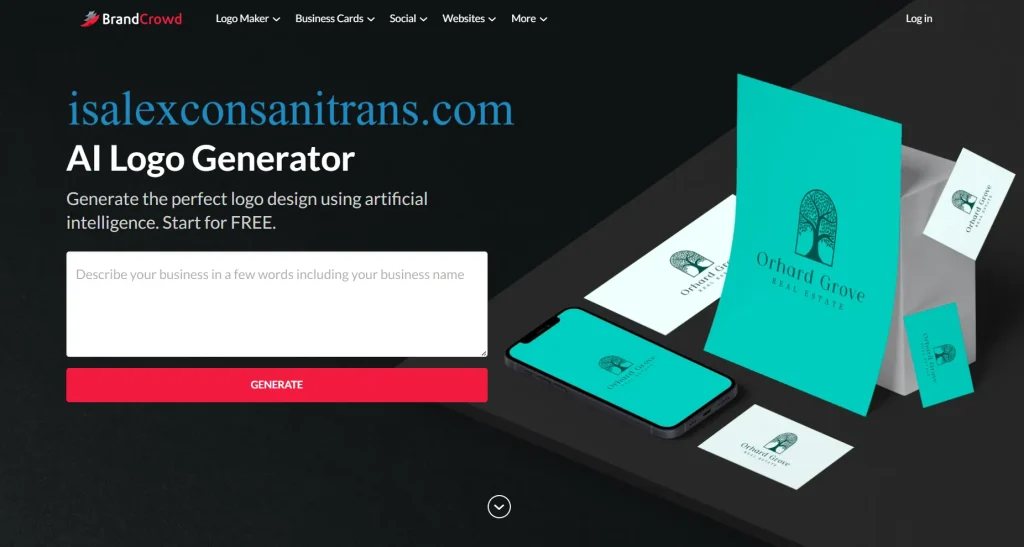
BrandCrowd is an online logo maker and branding platform built around a large library of designer-made logo templates. You enter your business name and industry, browse matches, then customize colors, fonts and layouts in an editor.
Third-party software directories describe its logo library as one of the most extensive online, with every logo handcrafted by professional designers around the world. Beyond logos, it now bundles business cards, social media graphics and a website builder, positioning itself as a small-business brand identity toolkit.
How Does the BrandCrowd Logo Maker Work?
You can go from idea to downloadable logo in roughly 10 to 15 minutes.
- Enter your business name, and optionally a tagline.
- Choose your industry and style preferences.
- Browse the suggested logo templates, including AI-matched options.
- Open a favorite in the design editor and adjust colors, fonts, icons and layout.
- Preview it on mockups such as business cards or social profiles.
- Pick a plan to download the files.
This template-first approach is faster than a blank canvas, though your result will depend on how much you customize.
BrandCrowd Features Worth Knowing
Logo Design and Customization
The editor handles the basics well: swapping colors, changing typefaces and rearranging elements. Paid plans advertise unlimited edits and downloads, which matters if your branding evolves. ecomm.design
What File Formats Do You Get?
Paid logo packs are listed with high-resolution PNG and JPG files, transparent backgrounds, and vector formats (SVG, EPS and PDF). Vector files are the important part. They scale to any size without blurring, which you need for signage, packaging, embroidery or large-format printing.
Business Cards and Digital Business Cards
Listings for the Premium Logo Pack mention 200+ business card templates. You can design a print-ready card from your logo, and the platform also supports digital business cards with shareable links. Printing may be a separate purchase.
Social Media Templates
Plan listings cite 30+ social media design tools and 3,000+ templates. These cover profile pictures, posts, and banners for platforms like YouTube and LinkedIn. Used consistently, they help keep your social media branding aligned with your logo.
Brand Kit, Email Signatures and Letterheads
A brand kit stores your logo, colors and fonts in one place so every asset matches your brand guidelines. Higher tiers reportedly support multiple brands, which helps freelancers and agencies. Stationery items like email signatures and letterheads round out the set.
Website Builder
The top tier adds a website builder with templates and an AI-assisted setup. It’s convenient for a simple landing page, but treat it cautiously. One verified reviewer on Capterra in March 2026 specifically advised against using BrandCrowd for website development. If your site needs custom functionality, a dedicated platform like Wix, Squarespace or Shopify is the safer choice.
How Much Does BrandCrowd Cost?
BrandCrowd is subscription-based, with prices starting in the low-to-mid teens per month for a single logo pack. Figures differ between sources, which is normal when promotions and billing cycles vary.
| Plan | Reported price | Best for |
|---|---|---|
| Free | $0 | Previewing AI logo ideas |
| Premium Logo Pack | ~$9/mo (some listings) to ~$13/mo (others) | One logo plus business cards and social tools |
| Premium Plan | ~$14/mo | Fuller brand kit and design tools |
| Premium Logo Pack + Website | ~$22/mo | Logo plus a basic website |
One 2026 pricing tracker verified its figures in May 2026 and reports a Premium Logo Pack at $13 a month, a Premium Plan at $14, and a bundle with a website at $22. Meanwhile, several GetApp and Capterra listings show a Premium Logo Pack at $9 a month billed monthly. The tracker also notes a 69% discount for paying annually.
My advice: treat the checkout page as the final word, and check whether the displayed price is monthly, annual or a first-term promotion. Also check how cancellation and renewal work before entering payment details.
Is BrandCrowd Free to Use?
Partly. You can design and preview logos for free, but downloading a usable logo requires payment. The free tier reportedly offers AI logo previews, limited template access and a low-resolution download. That’s fine for testing ideas, not for putting a logo on a website, packaging or print.
Can You Use BrandCrowd Logos Commercially?
Yes, paid plans are marketed for business use, and BrandCrowd states that your logo is yours. Plan descriptions promise ownership and perpetual file storage. Two cautions apply:
- Read the current license terms, since they govern what “ownership” covers.
- Template-based logos can make trademark registration harder, because similar designs may exist. If you plan to trademark your logo, consult an attorney.
Can You Edit a Logo After Downloading It?
Yes. Paid plans advertise unlimited edits, so you can return to the editor and re-download. The vector files (SVG, EPS, PDF) can also be opened in tools like Adobe Illustrator for deeper changes.
BrandCrowd Ease of Use and Logo Quality
Ease of use is the platform’s strongest point. The guided flow suits non-designers, and the template library gives you a polished starting point.
Logo quality is good but not unique by default. Because designs come from a shared library, the best results come from changing colors, fonts and layout enough to make the logo yours. If you need a distinctive, one-of-a-kind identity or a full strategy behind it, custom logo design from a designer or agency is a better fit.
BrandCrowd Pros and Cons
Pros
- Fast, beginner-friendly logo creation
- Large library of designer-made logo templates
- Vector files (SVG, EPS, PDF) included on paid plans
- Business cards, social graphics and brand kit tools in one place
- Unlimited edits and downloads on paid plans
- Annual billing can lower the monthly cost significantly
Cons
- Free version won’t give you a usable logo file
- Reported pricing varies between sources and billing cycles
- Template-based designs may resemble other logos
- The website builder gets mixed reviews
- Subscription model means ongoing costs, so check renewal terms
Who Should Use BrandCrowd?
It’s best for small business owners, startups, side hustlers and freelancers who need a good-looking logo and basic marketing assets fast. Ecommerce sellers can also use the logo, social templates and brand kit to keep product pages and ads consistent.
It’s less suited to companies needing bespoke identity work, extensive brand guidelines, or advanced web development.
BrandCrowd Alternatives
| Platform | Strength | Consider it if… |
|---|---|---|
| Canva | Broad graphic design platform with huge template range | You want logo, social, presentations and print in one tool |
| Looka | AI-driven logo generator with brand kit | You prefer AI-generated concepts |
| Wix Logo Maker | Pairs with Wix website tools | Your site will live on Wix |
| Adobe Express | Free tier plus Adobe ecosystem | You already use Adobe products |
| 99designs | Custom logo design from human designers | You want a unique, contest-based design |
Capterra and GetApp list Canva as a direct alternative to BrandCrowd, and that’s a reasonable first comparison if your needs go beyond logos.
Is BrandCrowd Worth It?
For most small businesses, yes. It’s worth it when you want a professional-looking logo, vector files and matching marketing materials at a modest monthly price. It’s less compelling if you only need a logo once (a subscription may feel unnecessary), want a truly unique identity, or need a robust website. A smart approach is to design for free, compare the final price, and download only when you’re confident in the result.
Frequently Asked Questions
What do BrandCrowd reviews say?
Overall, users value the speed and the large template library, while criticism tends to focus on pricing clarity, subscriptions and the website builder. Public review sites show mixed individual experiences, including at least one very negative March 2026 reviewer on Capterra, so read several recent reviews before deciding.
Is the BrandCrowd logo maker good?
Yes, for quick, affordable logos. It’s strongest for non-designers who want template-based results with vector files. It’s weaker for highly custom brand identities.
How do I find the BrandCrowd.com login?
Go to BrandCrowd.com and select the login option to sign in with your account. If you can’t remember your details, use the password reset on the login screen or contact support through the Help Center.
What does the BrandCrowd logo cost and include?
The logo itself is the core product. Paid plans include high-resolution files, transparent backgrounds, vector formats and unlimited edits. Exact pricing depends on your plan and billing cycle.
Is there a free BrandCrowd logo maker?
You can create and preview logos for free, but full-resolution and vector downloads require a paid plan.
Does BrandCrowd have a name generator?
Yes, BrandCrowd offers a business name generator tool alongside its logo maker. It’s a handy starting point, but always check domain and trademark availability before committing.
Is there a BrandCrowd app download?
BrandCrowd is primarily a web-based platform you use in your browser. Check the Apple App Store and Google Play for any official mobile app, and be careful to download only from the verified developer.
What is the BrandCrowd contact number?
I couldn’t verify an official phone number, so I won’t list one. Use the support options on BrandCrowd’s Help Center page, or contact them through the official site to avoid scam numbers.
Final Verdict
BrandCrowd is a practical, affordable choice for entrepreneurs who want a polished logo and a consistent set of business assets without hiring a designer. Its strengths are speed, vector file access and bundled marketing tools. Its weaknesses are template similarity, variable pricing across listings and a website builder that isn’t its strongest suit. Test the editor for free, confirm the current price and renewal terms, and compare it with Canva or Looka before paying.
Author Bio: Hamid Ali is a technology and digital marketing writer specializing in branding tools, logo makers, SEO, and online business solutions. He creates practical, research-based reviews to help entrepreneurs and small businesses compare tools and choose the right solutions for their needs.
Author Name: Hamid Ali
Email: johanharwen314@gmail.com
Also Read;
[…] Brand Crowd Review (2026) […]